Top 7 Remotion AI Alternatives (2026)
January 5, 2026

Selina ZFocused on in-depth research in AI tools, AI video, and generative AI.
| Tool name | Best for | User review* | Pricing |
| Jitter | Designers creating precise UI & motion assets | Figma-like control for motion, not a generative tool | Free (watermark) · $15+ / month |
| Kling | Marketing teams producing cinematic visuals | Strong visual realism, weaker timing and control | Free · $6.99–$127.99 / month |
| AutoAE | Shorts & TikTok creators focused on performance | Very low learning curve and fast results, less predictable output | Free · $8.25–$166.58 / month |
| Hera | Explainer and news-style creators (maps, charts, data visuals) | Extremely fast for Vox-style motion graphics, with limited structural control | Free (watermark) · $20–$100 / month |
| Plainly | Teams automating After Effects videos with data | Studio-grade output, but tightly coupled to AE templates | From $69 / month (usage-based) |
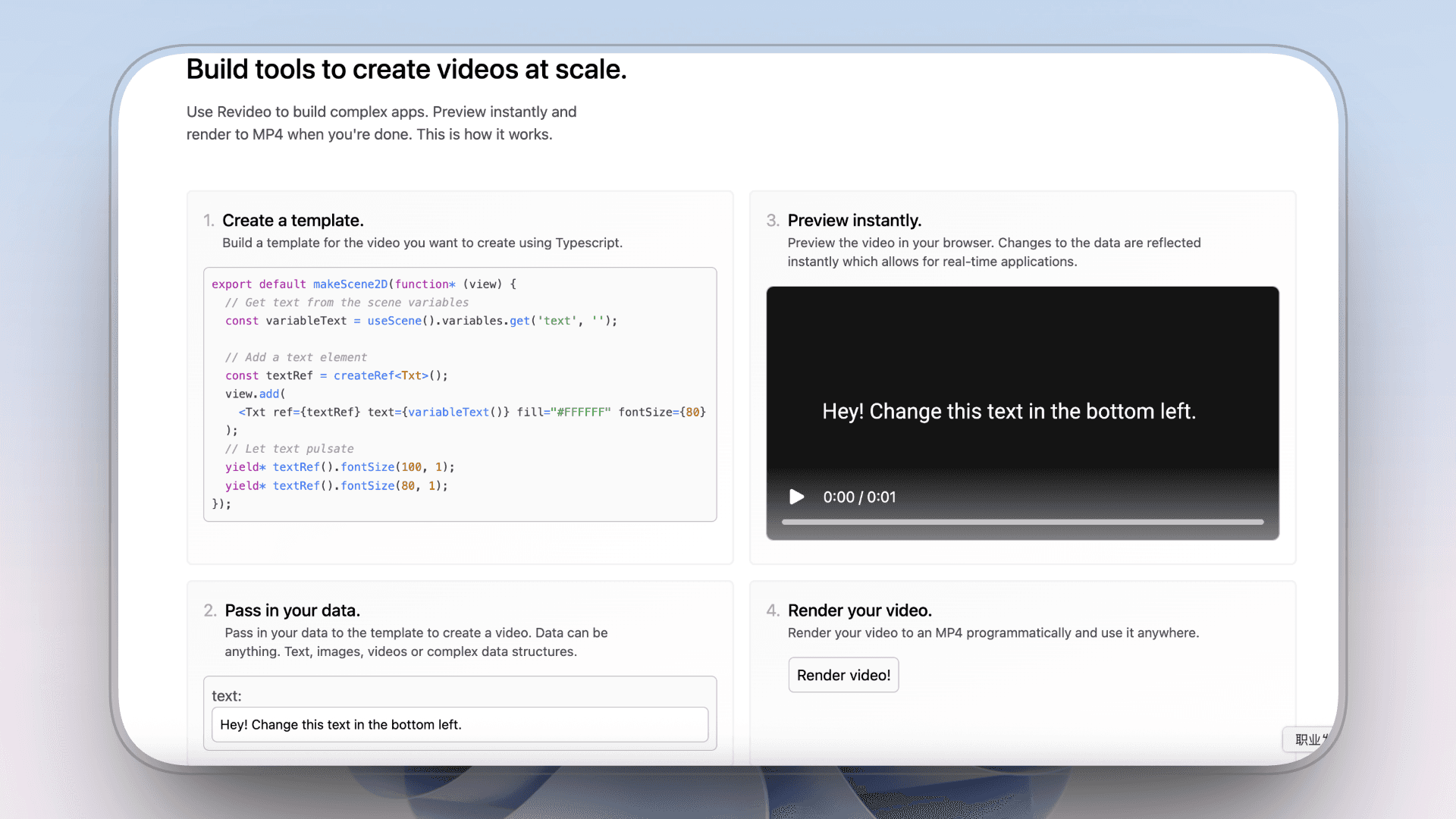
| Revideo | Developers building programmable video systems | Closest Remotion-style logic, but requires coding | Free (open source) |
Intro: The Era of Vibe Coding & Video Automation
In 2026, the line between "editing a video" and "coding a video" has blurred.
We are witnessing the rise of Vibe Coding in content creation — where creators use AI agents like Claude to write the code that builds their videos. At the center of this shift is Remotion.
Remotion represents Programmatic Video Creation. It uses React code to render exact video elements. When paired with an AI Orchestrator, you simply describe your "vibe," and the AI writes code to scrape data, stack skills, and generate thousands of consistent videos automatically.
It’s powerful: Scale, precision, and automation.
But let’s be real: Vibe Coding still requires a developer's mindset. You need to manage code, handle errors, and set up environments. Not every creator wants to debug a terminal just to post a video.
For those who want the automation of code without the headache of coding, we’ve curated the Top 7 Remotion Alternatives (2026). These tools let you scale your video production programmatically — no IDE required.
|
Tool
|
Best for
|
Biggest win
|
Starting price
|
Limits
|
|
Jitter
|
Designers creating UI & brand motion
|
Pixel-perfect motion without code
|
$15 / month
|
Not AI-generated
|
|
Kling
|
Marketers needing cinematic visuals
|
Strong realism from text prompts
|
$6.99 / month
|
Queue times
|
|
AutoAE
|
Creators focused on hooks & retention
|
Viral motion without timelines or AE
|
Free / Paid plans
|
Not programmable
|
|
Hera
|
Creators making maps, charts, explainers
|
Vox-style motion graphics in seconds
|
$20 / month
|
Limited logic, style-driven output
|
|
Plainly
|
Teams automating AE videos with data
|
Turns AE templates into a video API
|
$69 / month
|
Heavy AE dependency
|
|
Revideo
|
Developers building Remotion-like systems
|
Fully open-source, code-first rendering
|
Free (open source)
|
Coding required
|
|
LTX-2
|
Technical creators needing self-hosted video
|
Open weights + local audio-video sync
|
Free / $15 per month
|
High hardware & setup cost
|
How We Evaluated These Remotion AI Alternatives
We evaluated these tools from a creator and production-system perspective, focusing on how they perform in real, repeatable workflows—not isolated demos or edge cases.
Rather than novelty, we prioritized tools that can be used consistently at scale, whether for automated video systems, product content, or creator pipelines.
Our scoring is based on six practical factors:
-
Speed — time from input to usable output
-
Controlling — predictability and reusability
-
Output quality — consistency in real production
-
Ease of use — onboarding and learning curve
-
Pricing value — cost relative to output
-
Commercial readiness — licensing and monetization clarity
Score Interpretation
-
5 — Best-in-class, production-ready⭐️⭐️⭐️⭐️⭐️
-
4 — Strong performance with minor limits⭐️⭐️⭐️⭐️
-
3 — Unable with clear trade-offs⭐️⭐️⭐️
-
2 — Narrow or constrained use⭐️⭐️
-
1 — Not viable for regular production⭐️
How these tools differ from Remotion (in practice)
Remotion introduced a new way to think about video: logic-first, reusable, and code-driven.
The tools in this list don’t replace that approach — they translate it.
Some trade code for speed, others trade flexibility for automation, and a few preserve Remotion’s core idea in different forms.
Let’s start with the first tool on the list.
Revideo
The Open-Source "Vibe Coding" Twin
If you love the idea of Remotion (code-based video) but hate the licensing or React-only constraints, Revideo is your answer.
-
How it replaces Remotion: It is the closest literal alternative. It provides a code-first rendering framework where you define video logic using Typescript. Like Remotion, it allows for "deterministic rendering"—" meaning If you run the code 1,000 times, you get 1,000 perfect videos.
-
The "Vibe" Difference: It’s fully open-source. While Remotion has complex licensing for commercial use, Revideo is free to use for building custom SaaS or internal tools. It’s built for developers who want to build their own "text-to-video" engine.

Key Features
-
TypeScript-first animation framework
-
Parameterized video templates
-
Embeddable React player
Pros
-
Blazing-fast rendering performance
-
Suitable for building custom video SaaS or in-app video systems
-
Codebase fully hosted and maintained on GitHub
Cons
-
Coding required; not suitable for non-technical users
-
Logic is niche and best suited for specific use cases
-
No out-of-the-box visual UI or design presets
Pricing & Licensing
Revideo is fully open source and free to use.
-
No subscriptions
-
No watermarks
-
No commercial usage fees
Videos can be used in commercial and monetized projects. The main cost is engineering effort, not licensing.
Best For
-
Developers building custom video SaaS or internal tools
-
Teams replacing Remotion due to licensing, cost, or architectural constraints
-
Use cases requiring deterministic, repeatable, large-scale video generation
Not Ideal For
-
Creators looking for prompt-based or AI-generated motion graphics
-
Non-technical users or design-first workflows
-
Teams needing quick, one-off videos without engineering effort
Where Revideo Fits as a Remotion Alternative
If Remotion is a React-based motion framework with a strong ecosystem, Revideo is the lean, open-source counterpart—built for teams that want Remotion-like power without the overhead.
In this list, Revideo represents the pure engineering alternative to Remotion.
|
Dimension
|
Score
|
|
Speed
|
5.0 🌟🌟🌟🌟🌟
|
|
Controlling
|
5.0 🌟🌟🌟🌟🌟
|
|
Output Quality
|
4.0 🌟🌟🌟🌟
|
|
Ease of Use
|
1.0 🌟
|
|
Pricing Value
|
5.0 🌟🌟🌟🌟🌟
|
|
Commercial Readiness
|
5.0 🌟🌟🌟🌟🌟
|
AutoAE
The "Viral Hook" Engineer
AutoAE takes a radically different approach from Remotion.
Instead of treating motion graphics as code, AutoAE treats them as performance-driven visual assets. Its goal isn’t programmability or scale—it’s enabling creators to produce high-impact, viral-style motion graphics in seconds, without timelines, keyframes, or After Effects knowledge.
In the Remotion landscape, AutoAE represents the creator-first alternative: speed over structure, outcomes over systems.

Key Features
-
Script-to-Animation Generation
-
No-Timeline Editing Experience
-
One-click 3D Motion Effects
-
Pre-built Viral Motion Styles
Pros
-
Extremely low learning curve compared to After Effects
-
Enables fast creation of advanced motion graphics for short-form content
-
Well-suited for creators focused on engagement and performance metrics
-
Allows non-designers to produce influencer-style animations quickly
-
Effective for generating high-quality motion assets to be reused in editors like CapCut
Cons
-
Prompt roulette: output quality can vary depending on input
-
Limited logical and structural control over animations
-
Not designed for complex sequencing or custom animation systems
Where AutoAE Fits as a Remotion Alternative
AutoAE is not a technical replacement for Remotion.
Remotion solves motion graphics with code and logic. AutoAE solves motion graphics with speed and outcomes.
In this list, AutoAE represents the opposite end of the spectrum: a creator-first alternative for people who want Remotion-level visual impact without engineering, pipelines, or React.
If Remotion is built for teams who need control and scale, AutoAE is built for creators who need hooks, retention, and velocity.
Best For
-
Creators who want Remotion-level visuals without writing code
-
YouTubers and marketers optimizing for speed and performance
-
Non-designers who find After Effects or timelines intimidating
Not Ideal For
-
Developers building programmable or data-driven video systems
-
Teams needing deterministic, repeatable rendering logic
-
Long-form or highly structured animation workflows
Pricing
|
Plan
|
Price
|
Best for
|
|
Free
|
$0
|
Trying the platform or very small tests
|
|
Starter
|
$8.25 / month
|
Beginners or small projects
|
|
Creator
|
$20.75 / month
|
Regular content creators
|
|
Agency
|
$49.92 / month
|
Teams and agencies
|
|
Scale
|
$166.58 / month
|
High-volume or enterprise use
|
|
Single Video
|
$2.90 / video
|
Occasional one-off animations
|
|
Dimension
|
Score
|
|
Speed
|
5.0 🌟🌟🌟🌟🌟
|
|
Controlling
|
2.0 🌟🌟
|
|
Output Quality
|
4.0 🌟🌟🌟🌟
|
|
Ease of Use
|
5.0 🌟🌟🌟🌟🌟
|
|
Pricing Value
|
5.0 🌟🌟🌟🌟🌟
|
|
Commercial Readiness
|
4.0 🌟🌟🌟🌟
|
Plainly
The "After Effects" to API Bridge
Plainly approaches the Remotion problem from the opposite direction.
While Remotion replaces After Effects with code, Plainly keeps After Effects and turns it into a scalable, API-driven video system. Instead of programming animations in React, teams automate existing AE templates to generate videos from structured data at scale.
In short, Plainly is a workflow-level alternative to Remotion—designed for teams that want automation and volume without rewriting motion design as software.

Key Features
-
After Effects integration – Uses AE compositions as the source of truth
-
No-code automation layer – Generate videos from data without scripting
-
Video Editing API – Trigger renders programmatically from external systems
-
Template-based control (Plainly MCP) – Structured parameter exposure for edits
Pros
-
Cinema-quality output powered by After Effects
-
Strong bridge between designers and data-driven production
-
Enables scalable video generation without developer-heavy setups
-
Full commercial usage rights on paid plans
Cons
-
Heavy dependency on After Effects and its rendering pipeline
-
Modification flexibility is limited once templates are defined
-
Not suitable for dynamic, logic-heavy motion behaviors
Pricing
|
Plan Type
|
Price
|
Included Usage
|
Best For
|
|
Usage-based
|
$69 / month
|
50 rendered minutes
|
Small teams testing automated video
|
|
Usage-based
|
$134 / month
|
100 rendered minutes
|
Early-stage marketing automation
|
|
Usage-based
|
$259 / month
|
200 rendered minutes
|
Growing teams with steady output
|
|
Usage-based
|
$649 / month
|
600 rendered minutes
|
High-volume production workflows
|
|
Unlimited
|
From $1,500 / month
|
Unlimited minutes & storage
|
Large teams, internal platforms, SaaS
|
|
Enterprise
|
Custom pricing
|
Custom limits & features
|
4K+ exports, dedicated nodes, SLAs
|
Commercial Use & Watermark Policy
Plainly does not add watermarks to generated videos. Once on a paid plan, users receive full commercial usage rights, allowing videos to be used in marketing campaigns, client work, and monetized platforms.
Best For
-
Teams already use After Effects as their core motion tool
-
High-volume, data-driven video generation (ads, promos, product videos)
-
Designers who want to turn AE templates into scalable systems
Not Ideal For
-
Solo creators or low-volume YouTubers
-
Teams without After Effects experience
-
Prompt-based or generative motion use cases
|
Dimension
|
Score
|
|
Speed
|
5.0 🌟🌟🌟🌟🌟
|
|
Controlling
|
4.0 🌟🌟🌟🌟
|
|
Output Quality
|
5.0 🌟🌟🌟🌟🌟
|
|
Ease of Use
|
3.0 🌟🌟🌟
|
|
Pricing Value
|
3.0 🌟🌟🌟
|
|
Commercial Readiness
|
5.0 🌟🌟🌟🌟🌟
|
Jitter
The Visual "Component" Builder
Jitter approaches the Remotion problem from a design-first perspective.
Instead of programming motion graphics with code, Jitter allows designers to turn Figma-style layouts into pixel-perfect motion graphics directly in the browser—making it a practical alternative for teams that want control without engineering overhead.

Key Features
-
Web-based motion design tool
-
Template & component-based workflow
-
Real-time preview and export
Pros
-
Pixel-perfect, high-quality output
-
Fast iteration with instant feedback
-
Full visual control for UI / brand motion
Cons
-
Not a generator (manual design required)
-
Limited by browser performance
Pricing
-
Pro: $15 / mo
-
Team: $35 / mo
-
Freemium: Free to design and test, but exports are watermarked and limited to 720p
Best For
-
UI/UX designers create product, interface, or brand motion
-
Teams exporting 4K video or Lottie animations from design systems
-
Designers who want full visual control without code or After Effects
Not Ideal For
-
Prompt-based or AI-generated motion workflows
-
Large-scale, data-driven video automation
-
Engineering-first pipelines replacing Remotion logic
Where Jitter Fits as a Remotion Alternative
If Remotion treats motion graphics as software, Jitter treats them as interactive design.
In this list, Jitter is the designer-friendly alternative to Remotion—ideal for UI motion, product demos, and brand animations where precision matters more than automation.
|
Dimension
|
Score
|
|
Speed
|
3.0 🌟🌟🌟
|
|
Controlling
|
5.0 🌟🌟🌟🌟🌟
|
|
Output Quality
|
5.0 🌟🌟🌟🌟🌟
|
|
Ease of Use
|
4.0 🌟🌟🌟🌟
|
|
Pricing Value
|
4.0 🌟🌟🌟🌟
|
|
Commercial Readiness
|
5.0 🌟🌟🌟🌟🌟
|
Kling
The "Pixel" Generator (vs. Code Renderer)
Kling is not a Remotion replacement, but a high-end generative video engine. It earns its place here because it solves a different production problem: cinematic, prompt-driven visuals that would be costly or slow to build with code-based pipelines like Remotion.
If Remotion is about programmatic control, Kling is about visual realism and speed

Key Features
-
Native audio-visual synchronization
-
Cinematic physics & motion fidelit
-
High-efficiency text-to-video workflow
Pros
-
Produces visually convincing, ad-grade motion clips
-
Balances quality and speed for short-form video
-
Strong prompt comprehension reduces iteration cost
Cons
-
Queue-based generation can slow down workflows
-
Limited fine-grained control compared to traditional motion tools
Pricing & Access
-
Free Plan – Limited daily generations, visible watermark
-
Standard – $6.99/month (660 credits)
-
Pro – $25.99/month (3,000 credits)
-
Premier – $64.99/month (8,000 credits)
-
Ultra – $127.99/month (26,000 credits)
What Kling Does Well
-
Native audio-visual synchronization for generative clips
-
Strong physics, lighting, and motion fidelity
-
Designed for commercial-grade, cinematic visuals rather than templates
Typical output length (≈5s) already fits ads, hero visuals, and social media intros.
Best For
-
Commercial advertising & branded visual content
-
Teams needing cinematic realism without 3D or VFX pipelines
-
Marketing creatives prioritizing visual impact over structural logic
Not Ideal For
-
Data-driven or code-based video generation
-
Long-form, repeatable video automation workflows
-
Engineers replacing Remotion-style programmatic control
|
Dimension
|
Score
|
|
Speed
|
2.0 🌟🌟
|
|
Controlling
|
2.0 🌟🌟
|
|
Output Quality
|
5.0 🌟🌟🌟🌟🌟
|
|
Ease of Use
|
4.0 🌟🌟🌟🌟
|
|
Pricing Value
|
3.0 🌟🌟🌟
|
|
Commercial Readiness
|
4.0 🌟🌟🌟🌟
|

Hera
The Programmatic Data Visualizer
Hera is an AI motion graphics generator focused on information-driven visuals, such as maps, charts, and explainer-style graphics, designed to reach broadcast-level quality with minimal setup.
In Remotion-based workflows, Hera effectively replaces the need to build After Effects–style info graphics by hand, removing a major production dependency rather than replacing Remotion’s rendering logic itself.
Key Features
-
Text-to-Motion Generation
-
Intelligent Map Modules
-
Brand Guardrails
-
Vector-based Rendering
Pros
-
Exceptional speed for producing Vox-style maps and data visuals
-
Vector-quality, non-destructive outputs suitable for professional pipelines
-
Editable elements allow partial control after generation
-
A much lower learning curve than After Effects for information graphics
-
Ideal for teams that need repeatable, on-brand motion assets fast
Cons
-
Prompt roulette: results can vary, especially for complex layouts
-
Logic and sequencing control are limited compared to code-first tools
-
Not a general-purpose motion system — excels only in specific asset types
-
Lacks deterministic, frame-level control expected by developers
Pricing
-
Standard: $20 / month
-
Pro: $40 / month (watermark removal)
-
Mega: $100 / month
-
Annual plans: ~40% discount
-
Free plan available (watermarked, limited usage)
Best For
-
Content creators who want broadcast-quality motion graphics without After Effects
-
Marketing teams producing data-driven or editorial-style videos
-
YouTubers who need fast, reusable motion assets for explainers and Shorts
-
Non-designers who care more about clarity and speed than custom animation logic
Not Ideal For
-
Complex character animation or cinematic storytelling
-
Fully custom motion systems with multi-step logic
-
Developers looking for a programmable animation framework (Remotion fits better)
Commercial Use & Watermark Policy
Hera offers a free plan with watermarked exports and limited usage. To unlock watermark-free videos and full commercial usage rights, creators must subscribe to the Pro plan ($40/month) or higher.
Paid plans grant users the right to use generated motion graphics in commercial content, including YouTube videos, branded media, and client deliverables.
|
Dimension
|
Score
|
|
Speed
|
5.0 🌟🌟🌟🌟🌟
|
|
Controlling
|
3.0 🌟🌟🌟
|
|
Output Quality
|
4.0 🌟🌟🌟🌟
|
|
Ease of Use
|
5.0 🌟🌟🌟🌟🌟
|
|
Pricing Value
|
4.0 🌟🌟🌟🌟
|
|
Commercial Readiness
|
5.0 🌟🌟🌟🌟🌟
|
Hera vs Remotion: Capability Boundary
Hera is an output-first motion generator. You tell it what you want to show, and it gives you finished, broadcast-style motion graphics—maps, charts, explainers—without touching a timeline or keyframe.
Remotion is a logic-first motion framework. It doesn’t “make” visuals for you. Instead, it asks you to build motion like software, frame by frame, using React and JavaScript.
In short:
-
Hera replaces hours of manual After Effects work for specific motion assets
-
Remotion replaces the entire animation pipeline, but only if your team thinks in code
They don’t compete on features. They compete on who’s in the driver’s seat: the creator, or the codebase.
LTX
The Self-Hosted Generative Engine
LTX-2 sits at the open-source, self-hosted extreme of Remotion alternatives.
While most tools in this list focus on speed, templates, or cinematic polish, LTX-2 is built for creators who care more about owning the entire generation stack — from model weights to audio–video synchronization.
If Remotion is code-driven video assembly, LTX-2 is model-driven video generation: you run the engine locally, control how video and audio are produced, and scale without per-render API costs.
It’s less “push a button, get a video” — and more a foundation for custom video systems.

Key Features
-
Native Audio-Video Co-Generation (Local First)
-
DiT (Diffusion Transformer) Architecture for Efficient Video Generation
-
Fine-Grained Parameter Control
-
Open Weights & Self-Hosted Workflow
Pros
-
Zero marginal cost at scale
-
Full ownership, privacy, and customization
-
LoRA and model-level customization
-
Ideal as a raw video generation engine
Cons
-
High hardware requirements
-
Output quality depends heavily on tuning
-
Steep technical barrier
Pricing
-
Free plan: 800 credits
-
Lite: $15 / month
-
Standard: $35 / month
-
Pro: $125 / month
-
Annual plans offer 20% discount
No watermarks, no commercial usage fees.
Best For
-
Developers and technical creators
-
Teams needing self-hosted, privacy-safe video generation
-
Experimental pipelines and custom model tuning
Not Ideal For
-
Non-technical users
-
Teams expecting polished, ad-ready visuals out of the box
-
Low-end hardware environments
What LTX-2 Does Well
-
Native audio–video synchronization
-
Efficient DiT-based architecture for local inference
-
Fine-grained control with open weights and LoRA customization
You generate raw video locally, without API calls or vendor lock-in.
|
Dimension
|
Score
|
|
Speed
|
3.0 🌟🌟🌟
|
|
Controlling
|
4.0 🌟🌟🌟🌟
|
|
Output Quality
|
3.0 🌟🌟🌟
|
|
Ease of Use
|
1.0 🌟
|
|
Pricing Value
|
5.0 🌟🌟🌟🌟🌟
|
|
Commercial Readiness
|
5.0 🌟🌟🌟🌟🌟
|
Tool Scores Summary
|
Tool
|
Speed ⚡
|
Control 🎛️
|
Quality 💎
|
Ease of Use 👶
|
Price Value 💰
|
Commercial 💼
|
|
Jitter
|
3
|
5
|
5
|
4
|
4
|
5
|
|
Kling
|
2
|
2
|
5
|
4
|
3
|
4
|
|
AutoAE
|
5
|
2
|
4
|
5
|
5
|
4
|
|
Hera
|
5
|
3
|
4
|
5
|
4
|
5
|
|
Plainly
|
5
|
4
|
5
|
3
|
3
|
5
|
|
Revideo
|
5
|
5
|
4
|
1
|
5
|
5
|
|
LTX-2
|
3
|
4
|
3
|
1
|
5
|
5
|
Tool Recommendations by Creator Type
|
Creator Type
|
Recommended Tools
|
Reasoning
|
|
A. Shorts / TikTok creators
|
AutoAE, Hera
|
Prioritize speed and viral hooks; minimal setup needed
|
|
B. YouTube long-form teams
|
Plainly, Kling
|
Prioritize output quality and workflow integration for high-production videos
|
|
C. Designers / Motion Artists
|
Jitter, Hera
|
Prioritize precision, control, and brand consistency
|
|
D. Small teams / Individuals
|
LTX-2, Revideo
|
Prioritize budget-friendly, commercial-ready, or open-source solutions
|
Final Verdict: Which "Vibe" fits your workflow?
Remotion introduced a paradigm shift: Video as Code.
-
If you want "Video as Code" (but Open Source): Use Revideo.
-
If you want "Video as API" (but keep AE): Use Plainly.
-
If you want "Video as Viral Engineering" (No-Code): Use AutoAE.
-
If you want "Video as Design Systems": Use Jitter.
In 2026, you don't have to write React to automate your video production. You just need to choose the alternative that matches your technical appetite.